Printed enclosure
Publish the source file, print settings, fasteners, port clearances, thermal observations, and an assembly receipt.
development specimen
A desk radio with its own status face
A Heltec V4.2 board-level specimen with a proven local display, physical control, Reticulum carriage, and a stock-compatible RNode channel.
Retinue firmware UI · radio-mirror
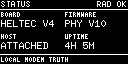
The screen is drawn by radio-mirror, which runs Retinue's own firmware UI (radio-face's renderer and Controller) at retinue revision b49df89, compiled to WebAssembly. Its status is retinue's fixed receipt fixtures; it is not connected to a radio. Read radio-mirror at that revision.
Site note · not a firmware screen
RNode is the selected image. Its upstream firmware owns the screen and controls, so this bench stops at that boundary and does not counterfeit its interface. radio-mirror draws only Retinue's firmware UI.
Site note · not a firmware screen
Meshtastic is the selected image. Its upstream firmware owns the screen and controls, so this bench stops at that boundary and does not counterfeit its interface. radio-mirror draws only Retinue's firmware UI.
Site note · not a firmware screen
MeshCore is the selected image. Its upstream firmware owns the screen and controls, so this bench stops at that boundary and does not counterfeit its interface. radio-mirror draws only Retinue's firmware UI.
What the screen says
Tap the fitted V4 button to step forward. Hold it for the menu; tap to move and hold to select.
A steps forward. B steps back. Hold A+B for the menu; in the menu, A moves, B selects, and holding B leaves.
With the screen focused, the A and B keys are the radio's buttons: hold them as long as you would the real ones, and the firmware's press classifier decides tap, hold or chord.
Pages, menu, buttons and LED follow Retinue's firmware Controller. Local radio detaches the host and leaves the four local pages; Attached host adds IDENTITY, LINKS, PEERS and VERIFY from retinue's host fixture; Radio fault is the V4 firmware's SX1262 init fault, which preempts every page.
The catalog V4 has one fitted button. The two-button face is an enclosure the same firmware supports.
Enable JavaScript to operate the controls. Each screen below was rendered by radio-mirror from Retinue's firmware UI at retinue revision b49df89.
Rendered at site build time by radio-mirror from Retinue's firmware UI at retinue revision b49df89, with retinue's receipt fixtures and the host attached; the fault is the V4 firmware's own radio-init fault. Each image's text is radio-face's text projection of the same screen.
status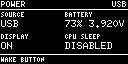
power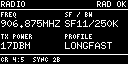
radio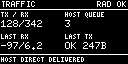
traffic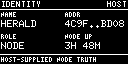
identity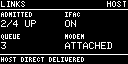
links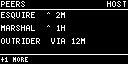
peers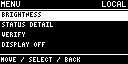
menu:brightness:0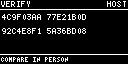
verify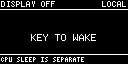
display-off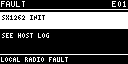
faultBoard-level development specimen. The published firmware ledger below records the exact V4 installation and recovery evidence; enclosure, power, antenna, and assembled-product work remain open.
Publish the source file, print settings, fasteners, port clearances, thermal observations, and an assembly receipt.
Select and test the battery, protection, charging path, connector, runtime, and replacement instructions.
Name the exact antenna and connector path, then record placement, strain relief, and RF acceptance.
Complete the authorization record, labeling, instructions, supplier traceability, product safety work, and assembled-product review before enabling purchase.
A proof says exactly what happened. It does not silently stand in for range, routing, loss, battery runtime, or product qualification.
proven
The fitted OLED, short press, long press, menu, display-off path, and consumed wake press passed physical acceptance.
proven
The image exchanged a byte-exact 4 KiB Reticulum Resource in both directions against the T114 while the UI remained active.
proven
The published V4 ledger retains installer and recovery receipts for the public cabled route. Firmware proof does not complete the enclosure, power, antenna, or sale recipe.
This ledger records demonstrated network behavior. It is independent of whether a one-click installation recipe or assembled product is ready.
demonstrated
Real RNS 1.4.0 configures and powers the V4 RNode channel, while reference Reticulum and the Rust stack validate one another over real RF.
demonstrated
Sennet text transmitted through V4 direct-PHY firmware was accepted, decrypted, and rebroadcast by a stock Meshtastic node.
demonstrated
Tucket exchanged authenticated adverts, encrypted text, acknowledgements, and reciprocal routes with official MeshCore companion firmware.
Firmware belongs to the owner. Installation recipes are tracked separately from network support, and one SX1262 radio runs one selected personality at a time.
Read the published Retinue package index ↗proven recipe
Firmware publisher: Merely Made.
Installer and recovery receipts are retained for: Windows x86-64, Intel macOS, Apple-silicon macOS, Linux x86-64.
Read installation instructions ↗Read recovery instructions ↗Read installer receipt ↗Read recovery receipt ↗proven recipe
Firmware publisher: Prns.
Installer and recovery receipts are retained for: Windows x86-64, Intel macOS, Apple-silicon macOS, Linux x86-64.
Read installation instructions ↗Read recovery instructions ↗Read installer receipt ↗Read recovery receipt ↗The purchase control comes last, after the recipe, evidence, network support, installation paths, and radio authorization.
This development specimen has no purchase link. Sale waits for a complete recipe, assembled-product testing, and a reviewed authorization record.